Archives
- By thread 1419
-
By date
- August 2019 59
- September 2019 118
- October 2019 165
- November 2019 97
- December 2019 35
- January 2020 58
- February 2020 204
- March 2020 121
- April 2020 172
- May 2020 50
- June 2020 158
- July 2020 85
- August 2020 94
- September 2020 193
- October 2020 277
- November 2020 100
- December 2020 159
- January 2021 38
- February 2021 87
- March 2021 146
- April 2021 73
- May 2021 90
- June 2021 86
- July 2021 123
- August 2021 50
- September 2021 68
- October 2021 66
- November 2021 74
- December 2021 75
- January 2022 98
- February 2022 77
- March 2022 68
- April 2022 31
- May 2022 59
- June 2022 87
- July 2022 141
- August 2022 38
- September 2022 73
- October 2022 152
- November 2022 39
- December 2022 50
- January 2023 93
- February 2023 49
- March 2023 106
- April 2023 47
- May 2023 69
- June 2023 92
- July 2023 64
- August 2023 103
- September 2023 91
- October 2023 101
- November 2023 94
- December 2023 46
- January 2024 75
- February 2024 79
- March 2024 104
- April 2024 63
- May 2024 40
- June 2024 160
- July 2024 80
- August 2024 70
- September 2024 62
- October 2024 121
- November 2024 117
- December 2024 89
- January 2025 59
- February 2025 104
- March 2025 96
- April 2025 107
- May 2025 52
- June 2025 72
- July 2025 60
- August 2025 81
- September 2025 124
- October 2025 63
- November 2025 22
Contributors
-
 Re: GitHub discussions
+1On 18 Nov 2020, at 11:41, Pedro M. Baeza (Tecnativa) <pedro.baeza@tecnativa.com> wrote:GitHub is adding a very interesting new feature: discussions, which we can consider similar to forums, and it brings the feature for filling the current gap when someone fills a question in issues (which I especially hate as some of you know, hehe, as it's not the proper feature for handling that). It even includes an option for converting an issue into a discussion:Unfortunately, it's still in a closed beta needing an invitation. We (Tecnativa) have asked for inclusion in https://github.com/github/feedback/discussions/24#discussioncomment-119862, and we are already trying it out in https://github.com/Tecnativa/doodba/discussions.It's worth considering its usage across OCA and maybe ask for beta testing in some of our repos. Some of the actions to perform will be:- Think in a general way to sort this section.- Add a possible FAQ.- Change the OCA website documentation for referring to this.- Change the OCA README template for redirecting to this section.Regards.
Re: GitHub discussions
+1On 18 Nov 2020, at 11:41, Pedro M. Baeza (Tecnativa) <pedro.baeza@tecnativa.com> wrote:GitHub is adding a very interesting new feature: discussions, which we can consider similar to forums, and it brings the feature for filling the current gap when someone fills a question in issues (which I especially hate as some of you know, hehe, as it's not the proper feature for handling that). It even includes an option for converting an issue into a discussion:Unfortunately, it's still in a closed beta needing an invitation. We (Tecnativa) have asked for inclusion in https://github.com/github/feedback/discussions/24#discussioncomment-119862, and we are already trying it out in https://github.com/Tecnativa/doodba/discussions.It's worth considering its usage across OCA and maybe ask for beta testing in some of our repos. Some of the actions to perform will be:- Think in a general way to sort this section.- Add a possible FAQ.- Change the OCA website documentation for referring to this.- Change the OCA README template for redirecting to this section.Regards._______________________________________________
Mailing-List: https://odoo-community.org/groups/contributors-15
Post to: mailto:contributors@odoo-community.org
Unsubscribe: https://odoo-community.org/groups?unsubscribe
by Alexey Pelykh - 12:21 - 18 Nov 2020 -
 GitHub discussions
GitHub is adding a very interesting new feature: discussions, which we can consider similar to forums, and it brings the feature for filling the current gap when someone fills a question in issues (which I especially hate as some of you know, hehe, as it's not the proper feature for handling that). It even includes an option for converting an issue into a discussion:Unfortunately, it's still in a closed beta needing an invitation. We (Tecnativa) have asked for inclusion in https://github.com/github/feedback/discussions/24#discussioncomment-119862, and we are already trying it out in https://github.com/Tecnativa/doodba/discussions.It's worth considering its usage across OCA and maybe ask for beta testing in some of our repos. Some of the actions to perform will be:- Think in a general way to sort this section.- Add a possible FAQ.- Change the OCA website documentation for referring to this.- Change the OCA README template for redirecting to this section.Regards.
GitHub discussions
GitHub is adding a very interesting new feature: discussions, which we can consider similar to forums, and it brings the feature for filling the current gap when someone fills a question in issues (which I especially hate as some of you know, hehe, as it's not the proper feature for handling that). It even includes an option for converting an issue into a discussion:Unfortunately, it's still in a closed beta needing an invitation. We (Tecnativa) have asked for inclusion in https://github.com/github/feedback/discussions/24#discussioncomment-119862, and we are already trying it out in https://github.com/Tecnativa/doodba/discussions.It's worth considering its usage across OCA and maybe ask for beta testing in some of our repos. Some of the actions to perform will be:- Think in a general way to sort this section.- Add a possible FAQ.- Change the OCA website documentation for referring to this.- Change the OCA README template for redirecting to this section.Regards.
by Pedro M. Baeza - 11:40 - 18 Nov 2020 -
Re: Sort Kanban by Drag'n Drop like in TreeView
Hi Peter,interesting, we actually have a very similar case for quality control.Users can take a lot of pictures, but would select few to print in a quality report. We did this entirely in odoo enterprise, using the document module.- Images to be printed are manually dragged into a specific workspace, and the qweb report will print only images in this workspace.Cheers,DominiqueOn Wed, 18 Nov 2020 at 17:02, Peter Hahn <peter.hahn@initos.com> wrote:Dear Contributors, I have a simple Kanban view without columns (see attached screenshot) I know you can sort items based of field values (e.g. `sequence` field) using `default_order` attribute for `kanban` tag. I was wondering if there is a possiblity to change order dynamically using drag'n drop of items like in tree view. Background: Users may add as much images as they like to the model, but only some of them are used for reports and exports. I would like to allow them easily to choose which ones, by allowing them to prioritize order and only use the Nth first ones. Thanks, Peter
_______________________________________________
Mailing-List: https://odoo-community.org/groups/contributors-15
Post to: mailto:contributors@odoo-community.org
Unsubscribe: https://odoo-community.org/groups?unsubscribe
by dominique.k - 10:31 - 18 Nov 2020 -
Sort Kanban by Drag'n Drop like in TreeView
Dear Contributors,

I have a simple Kanban view without columns (see attached screenshot)
I know you can sort items based of field values (e.g. `sequence` field)
using `default_order` attribute for `kanban` tag.

I was wondering if there is a possiblity to change order dynamically
using drag'n drop of items like in tree view.

Background: Users may add as much images as they like to the model, but
only some of them are used for reports and exports. I would like to
allow them easily to choose which ones, by allowing them to prioritize
order and only use the Nth first ones.

Thanks, Peter
by Pete Hahn - 09:56 - 18 Nov 2020 -
Re: Multiple files (images) upload
Thanks a lot for this hint.

I went another way since we already have our own storage model for this
and I didn’t had the time to change too much.

I made a simple Wizard using `FieldMany2ManyBinaryMultiFiles` widget.

Neverless, thanks for the hint to this interesting repo I didn’t knew of
before.

Am 17.11.20 um 11:32 schrieb Roussel, Denis:

> Hi Peter,

> You can look into  https://github.com/OCA/storage [1] to manage images the way you want.

> And you can review this  https://github.com/OCA/storage/pull/48 [2] that allows to handle multi image upload.

> Best regards,
by Pete Hahn - 09:51 - 18 Nov 2020 -
 Re: Analytic distribution / Analytic tags - Impact on journal items
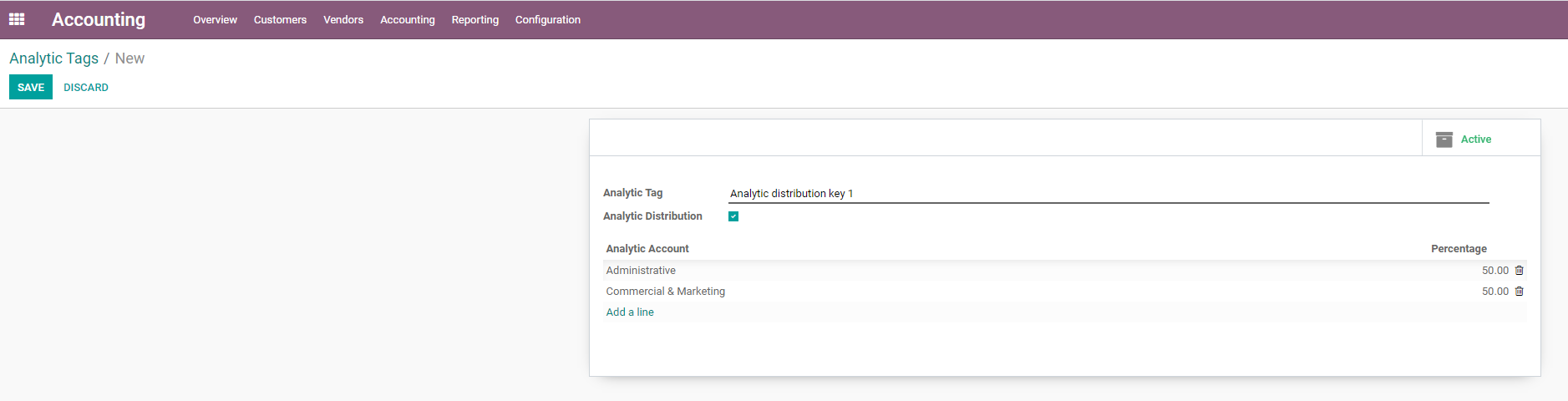
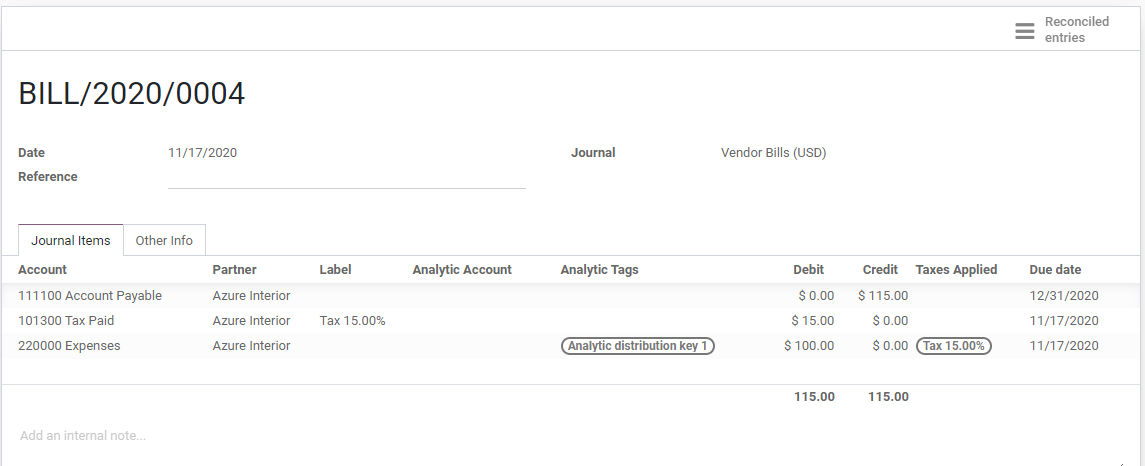
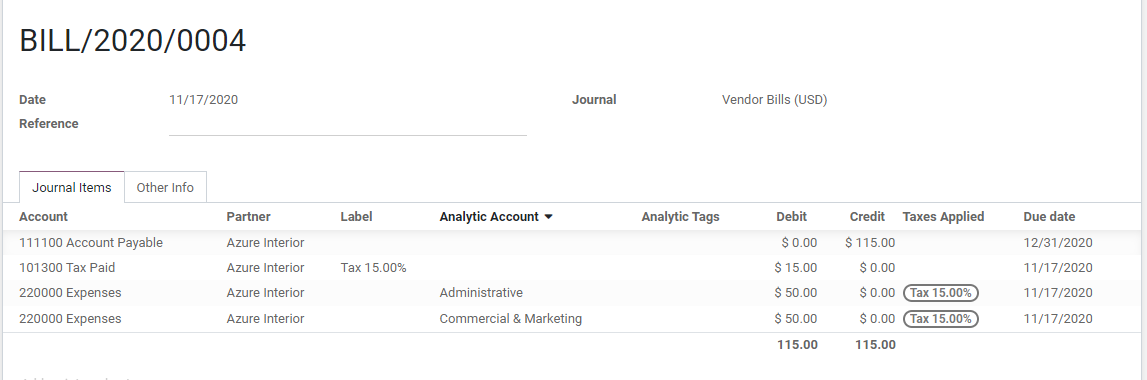
Hi Guillaume,We have the same needs and think similar to you.Before the existence of analytic tags (and analytic tags distributions) we have this module "account_analytic_distribution" that works this way:* on an invoice you choose the "distribution analytic account" on each line (it is a normal analytic account with distribution lines as the new analytic tags of odoo)* when validating the invoice, the account.move was created but account.move.line where splitted if you're using analytic distributionThat way, the distribution works for analytic and accounting reports.We haven't migrated or found an approach for v13+ yet. On v13, with the removal of account.invoice, I was thinking in something similar but perhaps more "manual" on the invoice, a button to split lines, but you won't have a way to go back to the distribution.On Tue, Nov 17, 2020 at 9:57 AM Vandamme, Guillaume <guillaume.vandamme@acsone.eu> wrote:Hello everyone,I'm currently facing an issue with the analytic distribution functionality of Odoo. I would like to share it with you as some may have faced the same issue recently and may be able to help. I'm working on Odoo V12, but the same situation occurs on different versions as well.When checking the 'Analytic Distribution' box on an analytic tag, this analytic tag can be used to allocate a certain percentage of an expense or an income on several analytic accounts.Example: On the picture below, the 'Analytic distribution key 1' analytic tag will allocate 50% of the expense/income on the 'Administrative' analytic account and the remaining 50% on the 'Commercial & Marketing' analytic account.When validating a simple vendor bill of 100 euros with this 'Analytic distribution key 1' selected, Odoo is generating a journal entry with three journal items: payable account, tax account and an expense account (100 euros) which is linked to the 'Analytic distribution key 1' analytic tag. My two analytic accounts (Administrative + Commercial & Marketing) don't appear here.Besides that, Odoo is also generating two analytic items in the 'Accounting --> Analytic items' menu to divide the total amount of the expense (100 euros) according to the distribution key (50% for both analytic accounts). These analytic lines can also be found in the 'Analytic Lines tab' on the expense journal item.My problem is that this breakdown on both analytic accounts doesn't appear in the journal items/entries, it only appears in the analytic items. This makes reporting based on journal items much more complicated (ex: Mis Report to generate a P&L by analytic account).I would rather prefer that the breakdown on both analytic accounts applies directly on the journal entry. Hence, instead of having one expense journal item (100 euros) related to the analytic tag, we would have two expense journal items (50 euros each),both related to their analytic account (Administrative or Commercial&Marketing). This would probably make things much easier.Any thoughts on this?Does this 'problem' sound familiar for some of you? Has anyone ever found a solution for this?Thank you very much for your help,Regards,Guillaume Vandamme--Guillaume Vandamme
Re: Analytic distribution / Analytic tags - Impact on journal items
Hi Guillaume,We have the same needs and think similar to you.Before the existence of analytic tags (and analytic tags distributions) we have this module "account_analytic_distribution" that works this way:* on an invoice you choose the "distribution analytic account" on each line (it is a normal analytic account with distribution lines as the new analytic tags of odoo)* when validating the invoice, the account.move was created but account.move.line where splitted if you're using analytic distributionThat way, the distribution works for analytic and accounting reports.We haven't migrated or found an approach for v13+ yet. On v13, with the removal of account.invoice, I was thinking in something similar but perhaps more "manual" on the invoice, a button to split lines, but you won't have a way to go back to the distribution.On Tue, Nov 17, 2020 at 9:57 AM Vandamme, Guillaume <guillaume.vandamme@acsone.eu> wrote:Hello everyone,I'm currently facing an issue with the analytic distribution functionality of Odoo. I would like to share it with you as some may have faced the same issue recently and may be able to help. I'm working on Odoo V12, but the same situation occurs on different versions as well.When checking the 'Analytic Distribution' box on an analytic tag, this analytic tag can be used to allocate a certain percentage of an expense or an income on several analytic accounts.Example: On the picture below, the 'Analytic distribution key 1' analytic tag will allocate 50% of the expense/income on the 'Administrative' analytic account and the remaining 50% on the 'Commercial & Marketing' analytic account.When validating a simple vendor bill of 100 euros with this 'Analytic distribution key 1' selected, Odoo is generating a journal entry with three journal items: payable account, tax account and an expense account (100 euros) which is linked to the 'Analytic distribution key 1' analytic tag. My two analytic accounts (Administrative + Commercial & Marketing) don't appear here.Besides that, Odoo is also generating two analytic items in the 'Accounting --> Analytic items' menu to divide the total amount of the expense (100 euros) according to the distribution key (50% for both analytic accounts). These analytic lines can also be found in the 'Analytic Lines tab' on the expense journal item.My problem is that this breakdown on both analytic accounts doesn't appear in the journal items/entries, it only appears in the analytic items. This makes reporting based on journal items much more complicated (ex: Mis Report to generate a P&L by analytic account).I would rather prefer that the breakdown on both analytic accounts applies directly on the journal entry. Hence, instead of having one expense journal item (100 euros) related to the analytic tag, we would have two expense journal items (50 euros each),both related to their analytic account (Administrative or Commercial&Marketing). This would probably make things much easier.Any thoughts on this?Does this 'problem' sound familiar for some of you? Has anyone ever found a solution for this?Thank you very much for your help,Regards,Guillaume Vandamme--Guillaume Vandamme
Business AnalystPhone : +32 2 888 31 31
Mobile : +32 475 49 88 27Email : guillaume.vandamme@acsone.euAcsone sa/nvWaterloo Atrium | 167, Drève Richelle | B-1410 Waterloo_______________________________________________
Mailing-List: https://odoo-community.org/groups/contributors-15
Post to: mailto:contributors@odoo-community.org
Unsubscribe: https://odoo-community.org/groups?unsubscribe
by Juan José Scarafía - 05:00 - 17 Nov 2020 -
Analytic distribution / Analytic tags - Impact on journal items
Hello everyone,I'm currently facing an issue with the analytic distribution functionality of Odoo. I would like to share it with you as some may have faced the same issue recently and may be able to help. I'm working on Odoo V12, but the same situation occurs on different versions as well.When checking the 'Analytic Distribution' box on an analytic tag, this analytic tag can be used to allocate a certain percentage of an expense or an income on several analytic accounts.Example: On the picture below, the 'Analytic distribution key 1' analytic tag will allocate 50% of the expense/income on the 'Administrative' analytic account and the remaining 50% on the 'Commercial & Marketing' analytic account.When validating a simple vendor bill of 100 euros with this 'Analytic distribution key 1' selected, Odoo is generating a journal entry with three journal items: payable account, tax account and an expense account (100 euros) which is linked to the 'Analytic distribution key 1' analytic tag. My two analytic accounts (Administrative + Commercial & Marketing) don't appear here.Besides that, Odoo is also generating two analytic items in the 'Accounting --> Analytic items' menu to divide the total amount of the expense (100 euros) according to the distribution key (50% for both analytic accounts). These analytic lines can also be found in the 'Analytic Lines tab' on the expense journal item.My problem is that this breakdown on both analytic accounts doesn't appear in the journal items/entries, it only appears in the analytic items. This makes reporting based on journal items much more complicated (ex: Mis Report to generate a P&L by analytic account).I would rather prefer that the breakdown on both analytic accounts applies directly on the journal entry. Hence, instead of having one expense journal item (100 euros) related to the analytic tag, we would have two expense journal items (50 euros each),both related to their analytic account (Administrative or Commercial&Marketing). This would probably make things much easier.Any thoughts on this?Does this 'problem' sound familiar for some of you? Has anyone ever found a solution for this?Thank you very much for your help,Regards,Guillaume Vandamme--Guillaume Vandamme
Business AnalystPhone : +32 2 888 31 31
Mobile : +32 475 49 88 27Email : guillaume.vandamme@acsone.euAcsone sa/nvWaterloo Atrium | 167, Drève Richelle | B-1410 Waterloo
by Guillaume Vandamme - 01:55 - 17 Nov 2020 -
 Re: Module to print Product Labels
Thanks Sylvain!I'll check it outIván TodorovichEl lun., 16 nov. 2020 a las 16:02, Sylvain LE GAL (<sylvain.legal@grap.coop>) escribió:Hi Ivan,At GRAP, we use a module, named product_print_category, available at the GRAP incubator repository. Basically,- you create many print categories with specific qweb template- you affect the print categories to the products- then, when a field is changed on a product, the product is marked as "to print"Maybe not exactly what are you looking for, but well, maybe it can help !kind regards.GRAP - Service informatique (Groupement Régional Alimentaire de Proximité)Site Web | FramaSphere | Facebook
Re: Module to print Product Labels
Thanks Sylvain!I'll check it outIván TodorovichEl lun., 16 nov. 2020 a las 16:02, Sylvain LE GAL (<sylvain.legal@grap.coop>) escribió:Hi Ivan,At GRAP, we use a module, named product_print_category, available at the GRAP incubator repository. Basically,- you create many print categories with specific qweb template- you affect the print categories to the products- then, when a field is changed on a product, the product is marked as "to print"Maybe not exactly what are you looking for, but well, maybe it can help !kind regards.GRAP - Service informatique (Groupement Régional Alimentaire de Proximité)Site Web | FramaSphere | Facebook
3 Grande rue des Feuillants, 69001 Lyon
Standard : (+33) 09.72.32.33.17Service Informatique : (+33) 09.73.79.64.40Astreinte Informatique : (+33) 06.81.85.61.43Member of the OCA (Odoo Community Association)Le lun. 16 nov. 2020 à 15:42, Iván Todorovich <ivan.todorovich@gmail.com> a écrit :Hi Kiril,Thanks for your reply! I'll check that out.We're not using a thermal printer, though. We need to print labels using a standard printer + self-adhesive labels.Best,Iván TodorovichEl lun., 16 nov. 2020 a las 11:32, Kiril Vangelovski (<kiril@lambda-is.com>) escribió:For Zebra printer labels (ZPL) check:
https://github.com/OCA/report-print-send/tree/12.0/printer_zpl2
On 16.11.20 14:57, Iván Todorovich wrote:
Hi all,
We have a requirement to print product labels with barcodes/info:
- Configure label size, margin, padding (similar config than https://github.com/OCA/partner-contact/tree/12.0/partner_label, but with the possibility of saving/reusing label layouts)
- Configure fields to print // label template
- Select number of labels per product to print
Do you know if there's any module like this in OCA?
Best,
Iván Todorovich_______________________________________________
Mailing-List: https://odoo-community.org/groups/contributors-15
Post to: mailto:contributors@odoo-community.org
Unsubscribe: https://odoo-community.org/groups?unsubscribe
--
Lambda IS DOOEL - free/open-source information systems implementation & development

Kiril Vangelovski - consultant/developer

web: https://www.lambda-is.com
tel: +38971753823
_______________________________________________
Mailing-List: https://odoo-community.org/groups/contributors-15
Post to: mailto:contributors@odoo-community.org
Unsubscribe: https://odoo-community.org/groups?unsubscribe
_______________________________________________
Mailing-List: https://odoo-community.org/groups/contributors-15
Post to: mailto:contributors@odoo-community.org
Unsubscribe: https://odoo-community.org/groups?unsubscribe
_______________________________________________
Mailing-List: https://odoo-community.org/groups/contributors-15
Post to: mailto:contributors@odoo-community.org
Unsubscribe: https://odoo-community.org/groups?unsubscribe
by Iván Todorovich - 01:10 - 17 Nov 2020 -
 Re: Multiple files (images) upload
Hi Peter,You can look into https://github.com/OCA/storage to manage images the way you want.And you can review this https://github.com/OCA/storage/pull/48 that allows to handle multi image upload.Best regards,On Tue, Nov 17, 2020 at 11:22 AM Peter Hahn <peter.hahn@initos.com> wrote:
Re: Multiple files (images) upload
Hi Peter,You can look into https://github.com/OCA/storage to manage images the way you want.And you can review this https://github.com/OCA/storage/pull/48 that allows to handle multi image upload.Best regards,On Tue, Nov 17, 2020 at 11:22 AM Peter Hahn <peter.hahn@initos.com> wrote:Dear Contributors, on a custom model we needed to have multiple images attached in a separate notebook page. We solved this using a kanban widget on a simple model, that contains the image as binary field. The drawback is, that you need to add each image one by one since you need to create new records of the containing model used for the kanban view to add images. The customer is asking for the possibility to add images by a multi select file dialog. Afaik this isn’t possible in odoo, since there is always exactly one binary field per image, so I would need something to create several records in one go. The only widget I know that is capable of doing this is the one used for adding attachments to forms (marked red in the screenshot below). Do you have any hints how to realize something like this? There seams to be nothing ready made available for this on the net. Thanks. Regards, Peter
_______________________________________________
Mailing-List: https://odoo-community.org/groups/contributors-15
Post to: mailto:contributors@odoo-community.org
Unsubscribe: https://odoo-community.org/groups?unsubscribe
--__________________________________________
Denis Roussel
Software Engineer
Acsone SA, Succursale de Liège (Val Benoît)
Tel : +32 2 888 31 49
Fax : +32 2 888 31 59
Gsm : +32 472 22 00 57Acsone sa/nv
Boulevard de la Woluwe 56 Woluwedal | B-1200 Brussels | BelgiumQuai Banning, 6 (Val Benoît) | B-4000 Liège | Belgium
Zone Industrielle 22 | L-8287 Kehlen | Luxembourg
by Denis Roussel - 11:30 - 17 Nov 2020 -
Multiple files (images) upload
Dear Contributors,

on a custom model we needed to have multiple images attached in a
separate notebook page.
We solved this using a kanban widget on a simple model, that contains
the image as binary field.
The drawback is, that you need to add each image one by one since you
need to create new records of the containing model used for the kanban
view to add images.
The customer is asking for the possibility to add images by a multi
select file dialog.
Afaik this isn’t possible in odoo, since there is always exactly one
binary field per image, so I would need something to create several
records in one go.

The only widget I know that is capable of doing this is the one used for
adding attachments to forms (marked red in the screenshot below).

Do you have any hints how to realize something like this?
There seams to be nothing ready made available for this on the net.

Thanks. Regards, Peter
by Pete Hahn - 11:20 - 17 Nov 2020 -
 Re: UBL EDI - DespatchAdvice aka Delivery Order
Hello guys,In case you are interested I'm working on a GS1 integration for Inbound and Outbound flows.Bests,On Mon, Nov 16, 2020 at 7:02 PM David Beal <david.beal@akretion.com> wrote:Hi Laurent,Thanks a lot for this feedback. I have to convince my client to use this format in v12.The use case concerns an external warehouse without Odoo.It sends goods for my customer and could send back a DespatchAdvice for each delivery.I have to reconcile this document with Odoo delivery orders.Le ven. 13 nov. 2020 à 17:16, Mignon, Laurent <laurent.mignon@acsone.eu> a écrit :Hi David,We plan to implement this process for Odoo 10 in the next few weeks...Regards,Laurent MignonOn Thu, Nov 12, 2020 at 2:37 PM David Beal <david.beal@akretion.com> wrote:Hi all,Is there some initiatives or plan to implements this flow in OdooAlso describe here:I suppose that is near of https://github.com/OCA/edi/blob/12.0/base_ubl/data/xsd-2.1/maindoc/UBL-ReceiptAdvice-2.1.xsdThanks a lotConsultantOdoo Intégration / Développement
Re: UBL EDI - DespatchAdvice aka Delivery Order
Hello guys,In case you are interested I'm working on a GS1 integration for Inbound and Outbound flows.Bests,On Mon, Nov 16, 2020 at 7:02 PM David Beal <david.beal@akretion.com> wrote:Hi Laurent,Thanks a lot for this feedback. I have to convince my client to use this format in v12.The use case concerns an external warehouse without Odoo.It sends goods for my customer and could send back a DespatchAdvice for each delivery.I have to reconcile this document with Odoo delivery orders.Le ven. 13 nov. 2020 à 17:16, Mignon, Laurent <laurent.mignon@acsone.eu> a écrit :Hi David,We plan to implement this process for Odoo 10 in the next few weeks...Regards,Laurent MignonOn Thu, Nov 12, 2020 at 2:37 PM David Beal <david.beal@akretion.com> wrote:Hi all,Is there some initiatives or plan to implements this flow in OdooAlso describe here:I suppose that is near of https://github.com/OCA/edi/blob/12.0/base_ubl/data/xsd-2.1/maindoc/UBL-ReceiptAdvice-2.1.xsdThanks a lotConsultantOdoo Intégration / Développement_______________________________________________
Mailing-List: https://odoo-community.org/groups/contributors-15
Post to: mailto:contributors@odoo-community.org
Unsubscribe: https://odoo-community.org/groups?unsubscribe
_______________________________________________
Mailing-List: https://odoo-community.org/groups/contributors-15
Post to: mailto:contributors@odoo-community.org
Unsubscribe: https://odoo-community.org/groups?unsubscribe
_______________________________________________
Mailing-List: https://odoo-community.org/groups/contributors-15
Post to: mailto:contributors@odoo-community.org
Unsubscribe: https://odoo-community.org/groups?unsubscribe
--Simone OrsiFull stack Python web developer, Odoo specialist, Odoo Community Board Member, Freelance in love with open source.
by Simone Orsi - 07:45 - 17 Nov 2020 -
 OCA 2021 RFQs - now open for quoting
Dear OCA Contributors,
OCA 2021 RFQs - now open for quoting
Dear OCA Contributors,
I hope this finds you all well.
We have published the 2021 RFQs:You'll also notice a new page on the website about OpenUpgrade 14.0 and how funding is distributed for this particular project. If you are interested in sponsoring the OCA you can also send us an email.--Rebecca GellatlyGeneral SecretaryOdoo Community Association
by Rebecca Gellatly - 09:10 - 16 Nov 2020 -
 Re: Module to print Product Labels
Hi Ivan,At GRAP, we use a module, named product_print_category, available at the GRAP incubator repository. Basically,- you create many print categories with specific qweb template- you affect the print categories to the products- then, when a field is changed on a product, the product is marked as "to print"Maybe not exactly what are you looking for, but well, maybe it can help !kind regards.GRAP - Service informatique (Groupement Régional Alimentaire de Proximité)Site Web | FramaSphere | Facebook
Re: Module to print Product Labels
Hi Ivan,At GRAP, we use a module, named product_print_category, available at the GRAP incubator repository. Basically,- you create many print categories with specific qweb template- you affect the print categories to the products- then, when a field is changed on a product, the product is marked as "to print"Maybe not exactly what are you looking for, but well, maybe it can help !kind regards.GRAP - Service informatique (Groupement Régional Alimentaire de Proximité)Site Web | FramaSphere | Facebook
3 Grande rue des Feuillants, 69001 Lyon
Standard : (+33) 09.72.32.33.17Service Informatique : (+33) 09.73.79.64.40Astreinte Informatique : (+33) 06.81.85.61.43Member of the OCA (Odoo Community Association)Le lun. 16 nov. 2020 à 15:42, Iván Todorovich <ivan.todorovich@gmail.com> a écrit :Hi Kiril,Thanks for your reply! I'll check that out.We're not using a thermal printer, though. We need to print labels using a standard printer + self-adhesive labels.Best,Iván TodorovichEl lun., 16 nov. 2020 a las 11:32, Kiril Vangelovski (<kiril@lambda-is.com>) escribió:For Zebra printer labels (ZPL) check:
https://github.com/OCA/report-print-send/tree/12.0/printer_zpl2
On 16.11.20 14:57, Iván Todorovich wrote:
Hi all,
We have a requirement to print product labels with barcodes/info:
- Configure label size, margin, padding (similar config than https://github.com/OCA/partner-contact/tree/12.0/partner_label, but with the possibility of saving/reusing label layouts)
- Configure fields to print // label template
- Select number of labels per product to print
Do you know if there's any module like this in OCA?
Best,
Iván Todorovich_______________________________________________
Mailing-List: https://odoo-community.org/groups/contributors-15
Post to: mailto:contributors@odoo-community.org
Unsubscribe: https://odoo-community.org/groups?unsubscribe
--
Lambda IS DOOEL - free/open-source information systems implementation & development

Kiril Vangelovski - consultant/developer

web: https://www.lambda-is.com
tel: +38971753823
_______________________________________________
Mailing-List: https://odoo-community.org/groups/contributors-15
Post to: mailto:contributors@odoo-community.org
Unsubscribe: https://odoo-community.org/groups?unsubscribe
_______________________________________________
Mailing-List: https://odoo-community.org/groups/contributors-15
Post to: mailto:contributors@odoo-community.org
Unsubscribe: https://odoo-community.org/groups?unsubscribe
by Sylvain LE GAL - 08:00 - 16 Nov 2020 -
 Re: UBL EDI - DespatchAdvice aka Delivery Order
Hi Laurent,Thanks a lot for this feedback. I have to convince my client to use this format in v12.The use case concerns an external warehouse without Odoo.It sends goods for my customer and could send back a DespatchAdvice for each delivery.I have to reconcile this document with Odoo delivery orders.Le ven. 13 nov. 2020 à 17:16, Mignon, Laurent <laurent.mignon@acsone.eu> a écrit :Hi David,We plan to implement this process for Odoo 10 in the next few weeks...Regards,Laurent MignonOn Thu, Nov 12, 2020 at 2:37 PM David Beal <david.beal@akretion.com> wrote:Hi all,Is there some initiatives or plan to implements this flow in OdooAlso describe here:I suppose that is near of https://github.com/OCA/edi/blob/12.0/base_ubl/data/xsd-2.1/maindoc/UBL-ReceiptAdvice-2.1.xsdThanks a lotConsultantOdoo Intégration / Développement
Re: UBL EDI - DespatchAdvice aka Delivery Order
Hi Laurent,Thanks a lot for this feedback. I have to convince my client to use this format in v12.The use case concerns an external warehouse without Odoo.It sends goods for my customer and could send back a DespatchAdvice for each delivery.I have to reconcile this document with Odoo delivery orders.Le ven. 13 nov. 2020 à 17:16, Mignon, Laurent <laurent.mignon@acsone.eu> a écrit :Hi David,We plan to implement this process for Odoo 10 in the next few weeks...Regards,Laurent MignonOn Thu, Nov 12, 2020 at 2:37 PM David Beal <david.beal@akretion.com> wrote:Hi all,Is there some initiatives or plan to implements this flow in OdooAlso describe here:I suppose that is near of https://github.com/OCA/edi/blob/12.0/base_ubl/data/xsd-2.1/maindoc/UBL-ReceiptAdvice-2.1.xsdThanks a lotConsultantOdoo Intégration / Développement_______________________________________________
Mailing-List: https://odoo-community.org/groups/contributors-15
Post to: mailto:contributors@odoo-community.org
Unsubscribe: https://odoo-community.org/groups?unsubscribe
_______________________________________________
Mailing-List: https://odoo-community.org/groups/contributors-15
Post to: mailto:contributors@odoo-community.org
Unsubscribe: https://odoo-community.org/groups?unsubscribe
by David BEAL - 07:00 - 16 Nov 2020 -
Re: Module to print Product Labels
Hi Kiril,Thanks for your reply! I'll check that out.We're not using a thermal printer, though. We need to print labels using a standard printer + self-adhesive labels.Best,Iván TodorovichEl lun., 16 nov. 2020 a las 11:32, Kiril Vangelovski (<kiril@lambda-is.com>) escribió:
For Zebra printer labels (ZPL) check:
https://github.com/OCA/report-print-send/tree/12.0/printer_zpl2
On 16.11.20 14:57, Iván Todorovich wrote:
Hi all,
We have a requirement to print product labels with barcodes/info:
- Configure label size, margin, padding (similar config than https://github.com/OCA/partner-contact/tree/12.0/partner_label, but with the possibility of saving/reusing label layouts)
- Configure fields to print // label template
- Select number of labels per product to print
Do you know if there's any module like this in OCA?
Best,
Iván Todorovich_______________________________________________
Mailing-List: https://odoo-community.org/groups/contributors-15
Post to: mailto:contributors@odoo-community.org
Unsubscribe: https://odoo-community.org/groups?unsubscribe
--
Lambda IS DOOEL - free/open-source information systems implementation & development

Kiril Vangelovski - consultant/developer

web: https://www.lambda-is.com
tel: +38971753823
_______________________________________________
Mailing-List: https://odoo-community.org/groups/contributors-15
Post to: mailto:contributors@odoo-community.org
Unsubscribe: https://odoo-community.org/groups?unsubscribe
by Iván Todorovich - 03:40 - 16 Nov 2020 -
 Re: Module to print Product Labels
For Zebra printer labels (ZPL) check:
https://github.com/OCA/report-print-send/tree/12.0/printer_zpl2
On 16.11.20 14:57, Iván Todorovich wrote:
Hi all,
We have a requirement to print product labels with barcodes/info:
- Configure label size, margin, padding (similar config than https://github.com/OCA/partner-contact/tree/12.0/partner_label, but with the possibility of saving/reusing label layouts)
- Configure fields to print // label template
- Select number of labels per product to print
Do you know if there's any module like this in OCA?
Best,
Iván Todorovich_______________________________________________
Mailing-List: https://odoo-community.org/groups/contributors-15
Post to: mailto:contributors@odoo-community.org
Unsubscribe: https://odoo-community.org/groups?unsubscribe
--
Lambda IS DOOEL - free/open-source information systems implementation & development

Kiril Vangelovski - consultant/developer

web: https://www.lambda-is.com
tel: +38971753823
by Kiril Vangelovski - 03:31 - 16 Nov 2020 -
Module to print Product Labels
Hi all,We have a requirement to print product labels with barcodes/info:- Configure label size, margin, padding (similar config than https://github.com/OCA/partner-contact/tree/12.0/partner_label, but with the possibility of saving/reusing label layouts)- Configure fields to print // label template- Select number of labels per product to printDo you know if there's any module like this in OCA?Best,Iván Todorovich
by Iván Todorovich - 02:56 - 16 Nov 2020 -
 Re: How to propagate custom info/note from Sale Order Line to Purchase Order Line using MTO
I was trying this direction. But somehow the second procurement that was
creating PO(L)s didn't have those - only the first one creating the move. But
will try again.

Best regards

	Radovan

On piatok 13. novembra 2020 16:32:10 CET Christian Zöllner wrote:

> Hi,   for Odoo 12 (maybe for later versions too) you can propagate your

> sales order line values by extending

> sale.order.line._prepare_procurement_values()   Later on - i won't get into

> detail ;-) - those values should end up in

> purchase.order.line._update_purchase_order_line().   That should be enough

> to get values from sales order lines through procurement to purchase order

> lines.   Best Regards Christian    Von: *"Radovan Skolnik"

> <radovan@skolnik.info> An: *"Odoo Community Association, (OCA)

> Contributors" <contributors@odoo-community.org> Gesendet: *Freitag, 13.

> November 2020 15:37:00 Betreff: *How to propagate custom info/note from

> Sale Order Line to Purchase Order Line using MTO    Hello, for our

> customers we offer standard products but also one-off custom-made stuff

> that we order from our suppliers. These are for example special tables with

> individual dimensions for each project.

> So we have a "template" product (not in the Odoo meaning) that we put into

> Sale Order and in the special SOL field we specify the dimensions. Now if

> the customer accepts the offer, Purchase Order is automatically created as

> we have MTO setup. We do not group POs nor POLs, so each SOL gets its own

> POL. Now how would I be able to propagate contents of that special SOL

> field into its apropriate POL? Or should I use any other approach?

> Thank you very much. Best regards

> Radovan Skolnik

>

>

> _______________________________________________             Mailing-List:

> https://odoo-community.org/groups/contributors-15 [1]             Post to:

> mailto:contributors@odoo-community.org             Unsubscribe:

> https://odoo-community.org/groups?unsubscribe [2] --  Christian Zöllner

> E-Mail: c.zoellner@intero-technologies.de  Intero Technologies GmbH

> Heinrich-Heine-Ring 76 D - 18435 Stralsund Tel: +49 (0) 3831 – 44 55 7 - 0

> Fax: +49 (0) 3831 – 44 55 7 - 79  Internet: www.intero-technologies.de

> Intero Technologies GmbH • Firmensitz: Heinrich-Heine-Ring 76, 18435

> Stralsund , Deutschland • Registergericht: Amtsgericht Stralsund, HRB 7076

> • Geschäftsführer: Frank Löffler, Lars Lifson • USt-Ident.Nr. DE 251251697

> This eMail and its content is dedicated to the intended recipient only. If

> you have received it in error please contact the sender immediately by fax

> or return eMail. Please then delete the eMail and any copies of it.

> _______________________________________________

> Mailing-List: https://odoo-community.org/groups/contributors-15 [3]

> Post to: mailto:contributors@odoo-community.org

> Unsubscribe: https://odoo-community.org/groups?unsubscribe [4]

>

>

>

> [1] https://odoo-community.org/groups/contributors-15

> [2] https://odoo-community.org/groups?unsubscribe

> [3] https://odoo-community.org/groups/contributors-15

> [4] https://odoo-community.org/groups?unsubscribe
by Radovan Skolnik - 06:06 - 14 Nov 2020 -
Re: How to propagate custom info/note from Sale Order Line to Purchase Order Line using MTO
In a way yes. This is already done (at least partially) by sale_stock,
purchase_stock, sale_purchase. But in this scenario PO(L)s are created by
stock rules that are created in between (not using dropshipping). So the
PO(L)s are created from these stock rules and not directly from SO(L)s. Maybe
there is a link between I do not know.

So far I like Pedro's idea the best but have to investigate how and if this
would work in my scenario.

Best regards

	Radovan

On piatok 13. novembra 2020 16:12:29 CET Yann Papouin wrote:

> You want create a link between a POL and SOL to access your specific SOL

> fields for each POL ?

>

> _______________________________________________

> Mailing-List: https://odoo-community.org/groups/contributors-15 [1]

> Post to: mailto:contributors@odoo-community.org

> Unsubscribe: https://odoo-community.org/groups?unsubscribe [2]

>

>

>

> [1] https://odoo-community.org/groups/contributors-15

> [2] https://odoo-community.org/groups?unsubscribe
by Radovan Skolnik - 06:06 - 14 Nov 2020 -
Re: How to propagate custom info/note from Sale Order Line to Purchase Order Line using MTO
Thanx Ivan, will have a look and adapt if needed.

Best regards

	Radovan

On piatok 13. novembra 2020 16:12:26 CET Iván Todorovich wrote:

> Forgot to mention that’s 12.0

> Le ven. 13 nov. 2020 à 12:00, Iván Todorovich < ivan.todorovich@gmail.com

> [1] > a écrit : Hi Radovan,

> We've done something similar like this:

> class PurchaseOrderLine(models.Model):

> _inherit = 'purchase.order.line'

> def _merge_in_existing_line(

> self, product_id, product_qty, product_uom,

> location_id, name, origin, values):

> """ Avoid merging lines if they have different names """

> line_name = ', '.join(values['move_dest_ids'].mapped('name'))

> if self.name [2] != line_name:

> return False

> return super()._merge_in_existing_line(

> product_id, product_qty, product_uom, location_id,

> name, origin, values)

>

> class StockRule(models.Model):

> _inherit = 'stock.rule'

> def _make_po_get_domain(self, values, partner):

> """ We want to create one purchase order per origin """

> res = super(StockRule, self)._make_po_get_domain(values, partner)

> if 'move_dest_ids' in values:

> origin = ', '.join(values['move_dest_ids'].mapped('origin'))

> res += (('origin', '=', origin),)

> return res

> def _prepare_purchase_order_line(

> self, product_id, product_qty, product_uom,

> values, po, partner):

> """ Replace the name with the name in the destination movement,

> this way we translate custom attribute values """

> res = super()._prepare_purchase_order_line(

> product_id, product_qty, product_uom, values, po, partner)

> # Copy name from move_ids, if available

> if 'move_dest_ids' in values:

> name = ', '.join(values['move_dest_ids'].mapped('name'))

> if name:

> res.update({'name': name})

> # Copy name from sale order (needed for dropshipping)

> elif 'sale_line_id' in values:

> sol_id = self.env['sale.order.line'].browse(values['sale_line_id'])

> if sol_id:

> res.update({'name': sol_id.name [3] })

> return res

> Best,

> * Iván Todorovich *

> El vie., 13 nov. 2020 a las 11:58, Radovan Skolnik (< radovan@skolnik.info

> [4] >) escribió: Hello Daniel,

> but isn't this used for Services only? I have tried it but it never gets

> called with Products. With Products the flow goes through Procurements.

> Best regards

> Radovan

>

> On piatok 13. novembra 2020 15:46:48 CET Daniel Reis wrote:

> > Hello,

> >

> > You can extend the "_purchase_service_prepare_order_values" method,

> > originally declared at addons/sale_purchase/models/sale_order.py.

> > That prepares the data used to create the POL.

> >

> > Thanks

> > Daniel

> >

> > On 13/11/2020 14:37, Radovan Skolnik

> > wrote:

> >

> >

> > Hello,

> > for our customers we offer standard products but also one-off custom-made

> > stuff that we order from our suppliers. These are for example special

> > tables with individual dimensions for each project.

> > So we have a "template" product (not in the Odoo meaning) that we put into

> > Sale Order and in the special SOL field we specify the dimensions. Now if

> > the customer accepts the offer, Purchase Order is automatically created as

> > we have MTO setup. We do not group POs nor POLs, so each SOL gets its own

> > POL. Now how would I be able to propagate contents of that special SOL

> > field into its apropriate POL? Or should I use any other approach?

> > Thank you very much. Best regards

> > Radovan Skolnik

> >

> >

> > _______________________________________________

> > Mailing-List:  https://odoo-community.org/groups/contributors-15 [5] [1]

> > Post to: mailto: contributors@odoo-community.org [6] [2]

> > Unsubscribe:  https://odoo-community.org/groups?unsubscribe [7] [3]

> >

> >

> >

> >

> > _______________________________________________

> > Mailing-List:  https://odoo-community.org/groups/contributors-15 [8] [4]

> > Post to: mailto: contributors@odoo-community.org [9]

> > Unsubscribe:  https://odoo-community.org/groups?unsubscribe [10] [5]

> >

> >

> >

> > [1]  https://odoo-community.org/groups/contributors-15 [11]

> > [2] mailto: contributors@odoo-community.org [12]

> > [3]  https://odoo-community.org/groups?unsubscribe [13]

> > [4]  https://odoo-community.org/groups/contributors-15 [14]

> > [5]  https://odoo-community.org/groups?unsubscribe [15]

>

> _______________________________________________

> Mailing-List: https://odoo-community.org/groups/contributors-15 [16]

> Post to: mailto: contributors@odoo-community.org [17]

> Unsubscribe: https://odoo-community.org/groups?unsubscribe [18]

>

> --

>

> * Iván Todorovich *

> _______________________________________________

> Mailing-List: https://odoo-community.org/groups/contributors-15 [19]

> Post to: mailto:contributors@odoo-community.org

> Unsubscribe: https://odoo-community.org/groups?unsubscribe [20]

>

>

>

> [1] mailto:ivan.todorovich@gmail.com

> [2] http://self.name

> [3] http://sol_id.name

> [4] mailto:radovan@skolnik.info

> [5] https://odoo-community.org/groups/contributors-15

> [6] mailto:contributors@odoo-community.org

> [7] https://odoo-community.org/groups?unsubscribe

> [8] https://odoo-community.org/groups/contributors-15

> [9] mailto:contributors@odoo-community.org

> [10] https://odoo-community.org/groups?unsubscribe

> [11] https://odoo-community.org/groups/contributors-15

> [12] mailto:contributors@odoo-community.org

> [13] https://odoo-community.org/groups?unsubscribe

> [14] https://odoo-community.org/groups/contributors-15

> [15] https://odoo-community.org/groups?unsubscribe

> [16] https://odoo-community.org/groups/contributors-15

> [17] mailto:contributors@odoo-community.org

> [18] https://odoo-community.org/groups?unsubscribe

> [19] https://odoo-community.org/groups/contributors-15

> [20] https://odoo-community.org/groups?unsubscribe
by Radovan Skolnik - 05:55 - 14 Nov 2020