- Mailing Lists
- Contributors
- QWeb widget templates - unable to use extension inheritance mode?
Archives
- By thread 1419
-
By date
- August 2019 59
- September 2019 118
- October 2019 165
- November 2019 97
- December 2019 35
- January 2020 58
- February 2020 204
- March 2020 121
- April 2020 172
- May 2020 50
- June 2020 158
- July 2020 85
- August 2020 94
- September 2020 193
- October 2020 277
- November 2020 100
- December 2020 159
- January 2021 38
- February 2021 87
- March 2021 146
- April 2021 73
- May 2021 90
- June 2021 86
- July 2021 123
- August 2021 50
- September 2021 68
- October 2021 66
- November 2021 74
- December 2021 75
- January 2022 98
- February 2022 77
- March 2022 68
- April 2022 31
- May 2022 59
- June 2022 87
- July 2022 141
- August 2022 38
- September 2022 73
- October 2022 152
- November 2022 39
- December 2022 50
- January 2023 93
- February 2023 49
- March 2023 106
- April 2023 47
- May 2023 69
- June 2023 92
- July 2023 64
- August 2023 103
- September 2023 91
- October 2023 101
- November 2023 94
- December 2023 46
- January 2024 75
- February 2024 79
- March 2024 104
- April 2024 63
- May 2024 40
- June 2024 160
- July 2024 80
- August 2024 70
- September 2024 62
- October 2024 121
- November 2024 117
- December 2024 89
- January 2025 59
- February 2025 104
- March 2025 96
- April 2025 107
- May 2025 52
- June 2025 72
- July 2025 60
- August 2025 81
- September 2025 124
- October 2025 63
- November 2025 22
Contributors
 QWeb widget templates - unable to use extension inheritance mode?
Hello,
I am working on a module that would allow to assgin icons to website menus to be rendered in custom theme. This is what I achieved:
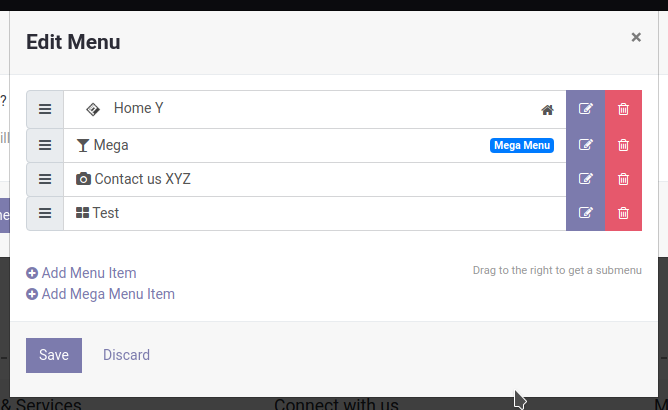
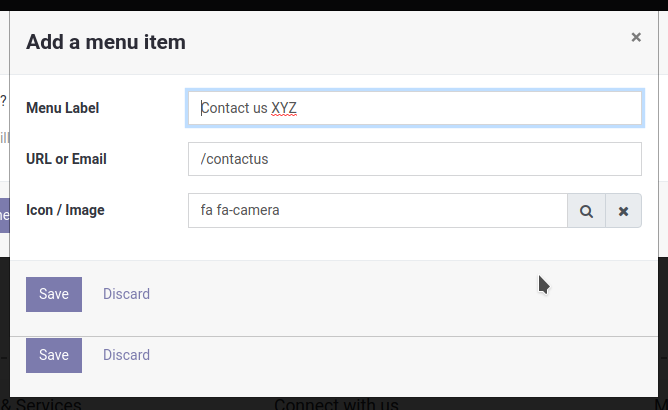
Everything works as expected but I stumbled to template inheritance issue on the first widget - that is template: 'website.contentMenu.dialog.edit' defined in /addons/website/static/src/xml/website.contentMenu.xml For individual menu items it uses recursively template 'website.contentMenu.dialog.submenu' that has no JavaScript object associated. Now I wanted to use extension inheritance to alter content of this sub-template to render image/icon. So my aim was to use something like this:
<t t-inherit="website.contentMenu.dialog.submenu" t-inherit-mode="extension">
<xpath expr="//span[hasclass('input-group-append')]" position="inside">
<button type="button" t-att-class="submenu.fields['image']" aria-label="Menu Image" title="Menu Image"/>
</xpath>
</t>
Now whetever I tried this didn't work for me. I also tried to use something similar on the main template which is used by my JavaScript object extended from original. Didn't work as well. If it took my template it would generate into HTML literally the content of outer <t> tag - so the HTML contained tags <xpath expr="..."> and so on.
I solved it temporarily but copying both templates into my own file and modified them. But I would love to make this more elegant and extend the templates in-place as stated in documentation. Has anyone some experience with this? In all of the source code of Odoo 13.0, 12.0 and 11.0 I didn't find a single use of this feature for a reference.
Thank you for any help. Best regards
Radovan Skolnik
by Radovan Skolnik - 11:26 - 6 Aug 2020
Follow-Ups
-
Re: QWeb widget templates - unable to use extension inheritance mode?
I am no expert as well so I may be missing something crucial. What you describe is deprecated mechanism that doesn't allow in-place extension of the template. I mean you cannot change existing template without assigning it a new name (at least as far as I know). For both there is nice documentation online: https://www.odoo.com/documentation/13.0/reference/qweb.html#template-inheritance
Initially I tried to use that mechanism you mention as well. But there is this (marked in red) in main template:
<div t-name="website.contentMenu.dialog.edit">
<select class="form-control mb16" t-if="widget.roots">
<t t-foreach="widget.roots" t-as="root">
<option t-att-value="root.id"><t t-esc="root.name"/></option>
</t>
</select>
<ul class="oe_menu_editor list-unstyled">
<t t-foreach="widget.menu.children" t-as="submenu">
<t t-call="website.contentMenu.dialog.submenu"/>
</t>
</ul>
<div class="mt32">
<small class="float-right text-muted">
Drag to the right to get a submenu
</small>
<a href="#" class="js_add_menu">
<i class="fa fa-plus-circle"/> Add Menu Item
</a><br/>
<a href="#" class="js_add_menu" data-type="mega">
<i class="fa fa-plus-circle"/> Add Mega Menu Item
</a>
</div>
</div>
That is call to sub-template that has no associated JS object. So if I extended that template it would have different name so I would need to modify this template to reflect that. Tried and failed. Didn't work.
Best regards
Radovan
On štvrtok 6. augusta 2020 12:46:56 CEST Graeme Gellatly wrote:
> I never did it that way. I'm no expert but usually I use t-jquery
> t-operation t-extend style syntax. On Thu, 6 Aug 2020, 9:26 pm Radovan
> Skolnik, < radovan@skolnik.info [1] > wrote: Hello,
>
> I am working on a module that would allow to assgin icons to website menus
> to be rendered in custom theme. This is what I achieved:
>
>
> Everything works as expected but I stumbled to template inheritance issue on
> the first widget - that is template: 'website.contentMenu.dialog.edit'
> defined in /addons/website/static/src/xml/website.contentMenu.xml For
> individual menu items it uses recursively template
> 'website.contentMenu.dialog.submenu' that has no JavaScript object
> associated. Now I wanted to use extension inheritance to alter content of
> this sub-template to render image/icon. So my aim was to use something like
> this:
>
> <t t-inherit="website.contentMenu.dialog.submenu"
> t-inherit-mode="extension"> <xpath
> expr="//span[hasclass('input-group-append')]" position="inside"> <button
> type="button" t-att-class="submenu.fields['image']" aria-label="Menu Image"
> title="Menu Image"/> </xpath>
> </t>
>
> Now whetever I tried this didn't work for me. I also tried to use something
> similar on the main template which is used by my JavaScript object extended
> from original. Didn't work as well. If it took my template it would
> generate into HTML literally the content of outer <t> tag - so the HTML
> contained tags <xpath expr="..."> and so on.
>
> I solved it temporarily but copying both templates into my own file and
> modified them. But I would love to make this more elegant and extend the
> templates in-place as stated in documentation. Has anyone some experience
> with this? In all of the source code of Odoo 13.0, 12.0 and 11.0 I didn't
> find a single use of this feature for a reference.
>
> Thank you for any help. Best regards
>
> Radovan Skolnik
> _______________________________________________
> Mailing-List: https://odoo-community.org/groups/contributors-15 [2]
> Post to: mailto: contributors@odoo-community.org [3]
> Unsubscribe: https://odoo-community.org/groups?unsubscribe [4]
>
>
> _______________________________________________
> Mailing-List: https://odoo-community.org/groups/contributors-15 [5]
> Post to: mailto:contributors@odoo-community.org
> Unsubscribe: https://odoo-community.org/groups?unsubscribe [6]
>
>
>
> [1] mailto:radovan@skolnik.info
> [2] https://odoo-community.org/groups/contributors-15
> [3] mailto:contributors@odoo-community.org
> [4] https://odoo-community.org/groups?unsubscribe
> [5] https://odoo-community.org/groups/contributors-15
> [6] https://odoo-community.org/groups?unsubscribe
by Radovan Skolnik - 01:31 - 6 Aug 2020 -
 Re: QWeb widget templates - unable to use extension inheritance mode?
I never did it that way. I'm no expert but usually I use t-jquery t-operation t-extend style syntax.On Thu, 6 Aug 2020, 9:26 pm Radovan Skolnik, <radovan@skolnik.info> wrote:
Re: QWeb widget templates - unable to use extension inheritance mode?
I never did it that way. I'm no expert but usually I use t-jquery t-operation t-extend style syntax.On Thu, 6 Aug 2020, 9:26 pm Radovan Skolnik, <radovan@skolnik.info> wrote:Hello,
I am working on a module that would allow to assgin icons to website menus to be rendered in custom theme. This is what I achieved:
Everything works as expected but I stumbled to template inheritance issue on the first widget - that is template: 'website.contentMenu.dialog.edit' defined in /addons/website/static/src/xml/website.contentMenu.xml For individual menu items it uses recursively template 'website.contentMenu.dialog.submenu' that has no JavaScript object associated. Now I wanted to use extension inheritance to alter content of this sub-template to render image/icon. So my aim was to use something like this:
<t t-inherit="website.contentMenu.dialog.submenu" t-inherit-mode="extension">
<xpath expr="//span[hasclass('input-group-append')]" position="inside">
<button type="button" t-att-class="submenu.fields['image']" aria-label="Menu Image" title="Menu Image"/>
</xpath>
</t>
Now whetever I tried this didn't work for me. I also tried to use something similar on the main template which is used by my JavaScript object extended from original. Didn't work as well. If it took my template it would generate into HTML literally the content of outer <t> tag - so the HTML contained tags <xpath expr="..."> and so on.
I solved it temporarily but copying both templates into my own file and modified them. But I would love to make this more elegant and extend the templates in-place as stated in documentation. Has anyone some experience with this? In all of the source code of Odoo 13.0, 12.0 and 11.0 I didn't find a single use of this feature for a reference.
Thank you for any help. Best regards
Radovan Skolnik
_______________________________________________
Mailing-List: https://odoo-community.org/groups/contributors-15
Post to: mailto:contributors@odoo-community.org
Unsubscribe: https://odoo-community.org/groups?unsubscribe
by Graeme Gellatly - 12:45 - 6 Aug 2020

